
Zustand A Simple and Powerful State Management Solution for Reac
State management is one of those topics every React developer eventually encounters.
At first, useState and useContext are enough. But as an application grows, you may find yourself passing state through multiple components, creating complex Context providers, or writing a lot of boilerplate just to share a few values.
This is where Zustand comes in.
Zustand is a small, simple state-management library for React that lets you create global stores with minimal boilerplate.
In this article, we'll understand:
- What Zustand is
- Why you might need it
- How Zustand works
- Creating your first store
- Reading and updating state
- Async actions
- Selectors
- Avoiding unnecessary re-renders
- Zustand vs Context API
- Zustand vs Redux
- A practical project example
- Best practices
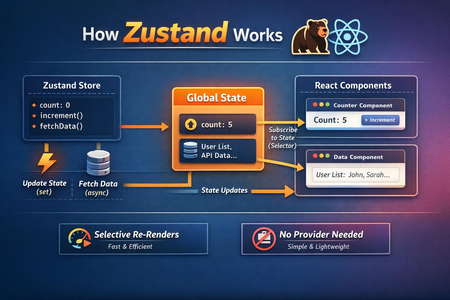
What Is Zustand?
Zustand is a lightweight state-management library for JavaScript and React.
Instead of putting shared state inside React Context providers, you create a store that can be accessed directly from your components.
A basic Zustand store looks like this:
import { create } from "zustand";

type CounterStore = {
  count: number;
  increment: () => void;
  decrement: () => void;
};

const useCounterStore = create<CounterStore>((set) => ({
  count: 0,

  increment: () =>
    set((state) => ({
      count: state.count + 1,
    })),

  decrement: () =>
    set((state) => ({
      count: state.count - 1,
    })),
}));
Now any component can access this state.
function Counter() {
  const count = useCounterStore((state) => state.count);
  const increment = useCounterStore((state) => state.increment);

  return (
    <div>
      <p>{count}</p>
      <button onClick={increment}>Increment</button>
    </div>
  );
}
That's essentially the core idea behind Zustand.
Why Do We Need State Management?
Imagine an application with the following structure:
App
 ├── Header
 │    └── UserProfile
 │
 ├── Sidebar
 │    └── UserBalance
 │
 └── Dashboard
      └── Transactions
Suppose the user's balance needs to be displayed in both the header and dashboard.
With local state, you might end up passing the balance through multiple components.
App
 ↓
Header
 ↓
UserProfile
This is commonly known as prop drilling.
With Zustand, the components can access the same store directly.
             Zustand Store
            /      |      \
           ↓       ↓       ↓
       Header   Sidebar  Dashboard
This makes shared state easier to organize.
Installing Zustand
Install Zustand using npm:
npm install zustand
Or with Yarn:
yarn add zustand
After installation, you can create your first store.
Creating a Zustand Store
Let's create a simple user store.
import { create } from "zustand";

type UserStore = {
  name: string;
  email: string;
  setUser: (name: string, email: string) => void;
};

export const useUserStore = create<UserStore>((set) => ({
  name: "",
  email: "",

  setUser: (name, email) =>
    set({
      name,
      email,
    }),
}));
The store contains:
State
 ├── name
 └── email

Actions
 └── setUser()
The set function is provided by Zustand and is used to update the store.
Reading State
Inside a component:
const name = useUserStore((state) => state.name);
You can also access multiple values:
const name = useUserStore((state) => state.name);
const email = useUserStore((state) => state.email);
Then:
function Profile() {
  const name = useUserStore((state) => state.name);
  const email = useUserStore((state) => state.email);

  return (
    <div>
      <h2>{name}</h2>
      <p>{email}</p>
    </div>
  );
}
Notice something important:
There is no Provider.
You don't need:
<UserProvider>
  <App />
</UserProvider>
The store can be consumed directly.
Updating State
Let's create a counter.
import { create } from "zustand";

type CounterStore = {
  count: number;
  increment: () => void;
};

export const useCounterStore = create<CounterStore>((set) => ({
  count: 0,

  increment: () =>
    set((state) => ({
      count: state.count + 1,
    })),
}));
Use it like this:
function Counter() {
  const count = useCounterStore((state) => state.count);
  const increment = useCounterStore((state) => state.increment);

  return (
    <>
      <h1>{count}</h1>

      <button onClick={increment}>
        Increment
      </button>
    </>
  );
}
When increment() executes, Zustand updates the store and subscribed components receive the new state.
The set Function
One of the most important concepts in Zustand is set.
You can update state directly:
set({
  name: "Vijay",
});
Or derive the new state from the previous state:
set((state) => ({
  count: state.count + 1,
}));
For values that depend on the previous state, the second approach is generally preferable.
For example:
set((state) => ({
  coins: state.coins - 10,
}));
This is particularly useful for applications such as wallets, counters, carts, and real-time usage tracking.
Actions Belong in the Store
Instead of putting business logic inside components, you can keep it inside the store.
For example:
type WalletStore = {
  coins: number;
  addCoins: (amount: number) => void;
  spendCoins: (amount: number) => void;
};

export const useWalletStore = create<WalletStore>((set) => ({
  coins: 1000,

  addCoins: (amount) =>
    set((state) => ({
      coins: state.coins + amount,
    })),

  spendCoins: (amount) =>
    set((state) => ({
      coins: state.coins - amount,
    })),
}));
Your component becomes simple:
const spendCoins = useWalletStore(
  (state) => state.spendCoins
);

spendCoins(10);
The component doesn't need to know how the wallet state is modified.
Async Actions
Zustand also works nicely with asynchronous operations.
For example, fetching a user:
type UserStore = {
  user: User | null;
  loading: boolean;
  fetchUser: () => Promise<void>;
};

export const useUserStore = create<UserStore>((set) => ({
  user: null,
  loading: false,

  fetchUser: async () => {
    set({ loading: true });

    const response = await fetch("/api/user");
    const user = await response.json();

    set({
      user,
      loading: false,
    });
  },
}));
Then:
function Profile() {
  const user = useUserStore((state) => state.user);
  const loading = useUserStore((state) => state.loading);
  const fetchUser = useUserStore((state) => state.fetchUser);

  // ...
}
However, it's important to distinguish between server state and client state.
Libraries such as TanStack Query are often better suited for server-state concerns like:
- API caching
- Request deduplication
- Refetching
- Pagination
- Background updates
Zustand is often a better fit for client-side application state.
Selectors: An Important Zustand Concept
Consider this:
const store = useUserStore();
You are subscribing to the entire store.
A better approach is usually to select only what the component needs:
const name = useUserStore((state) => state.name);
Now the component is specifically interested in name.
You can think of it like:
Zustand Store
│
├── name       ← Component subscribes
├── email
├── settings
├── notifications
└── preferences
The selector tells Zustand:
"I only care about this part of the store."
This can help prevent unnecessary component updates.
Selecting Multiple Values
You may need multiple values:
const name = useUserStore((state) => state.name);
const email = useUserStore((state) => state.email);
Or select an object:
const user = useUserStore((state) => ({
  name: state.name,
  email: state.email,
}));
When selecting objects or arrays, be mindful of reference equality and use the appropriate Zustand selector/equality mechanisms when necessary.
Zustand Store Architecture
For a larger application, don't put everything into one massive store.
Instead, separate state by responsibility.
src/
│
├── stores/
│   ├── authStore.ts
│   ├── userStore.ts
│   ├── walletStore.ts
│   ├── callStore.ts
│   └── settingsStore.ts
│
├── components/
├── screens/
└── services/
For example:
// authStore.ts
export const useAuthStore = create(...);

// walletStore.ts
export const useWalletStore = create(...);

// settingsStore.ts
export const useSettingsStore = create(...);
This makes the application easier to maintain.
A Real-World Example
Imagine we're building a calling application.
We might have state like:
Call Store
│
├── isCalling
├── callType
├── duration
├── remoteUser
├── startCall()
├── endCall()
└── updateDuration()
A store could look like:
type CallType = "audio" | "video" | null;

type CallStore = {
  isCalling: boolean;
  callType: CallType;
  duration: number;

  startCall: (type: CallType) => void;
  endCall: () => void;
};

export const useCallStore = create<CallStore>((set) => ({
  isCalling: false,
  callType: null,
  duration: 0,

  startCall: (type) =>
    set({
      isCalling: true,
      callType: type,
      duration: 0,
    }),

  endCall: () =>
    set({
      isCalling: false,
      callType: null,
      duration: 0,
    }),
}));
Then the call screen can simply subscribe to the state it needs:
function CallScreen() {
  const callType = useCallStore(
    (state) => state.callType
  );

  const duration = useCallStore(
    (state) => state.duration
  );

  return (
    <div>
      <p>{callType}</p>
      <p>{duration}s</p>
    </div>
  );
}
This keeps the UI layer focused on rendering while the store handles application state.
Zustand vs Context API
Zustand and React Context solve related but different problems.
| Feature | Context API | Zustand |
|---|---|---|
| Built into React | Yes | No |
| Global/shared state | Yes | Yes |
| Provider required | Yes | No |
| Boilerplate | Low–Medium | Low |
| Selective subscriptions | More manual | Built in through selectors |
| Devtools | Limited | Available through middleware |
| Async actions | Manual | Straightforward |
| Large application state | Can become cumbersome | Convenient |
Context is still an excellent choice for relatively stable values such as:
- Theme
- Locale
- Authentication context
- Dependency/configuration values
Zustand becomes attractive when you have frequently changing shared client state.
Zustand vs Redux
Redux is a mature state-management ecosystem with strong conventions and extensive tooling.
Zustand takes a much smaller and more direct approach.
A Redux architecture often involves concepts such as:
Component
   ↓
Dispatch Action
   ↓
Reducer
   ↓
Store
   ↓
Selector
   ↓
Component
With Zustand:
Component
   ↓
Store Action
   ↓
State Update
   ↓
Component
Neither approach is universally correct.
The choice depends on your application's requirements, team conventions, existing architecture, and desired level of structure.
Middleware
Zustand provides middleware that can extend stores with additional capabilities.
For example, persistence:
import { create } from "zustand";
import { persist } from "zustand/middleware";

export const useAuthStore = create(
  persist(
    (set) => ({
      token: null,

      setToken: (token: string) =>
        set({ token }),
    }),
    {
      name: "auth-storage",
    }
  )
);
This can persist selected client state between application sessions.
Other middleware and integrations can support use cases such as development tooling and state synchronization.
Important: Don't Put Everything in Zustand
One common mistake is treating Zustand as the place for all application data.
For example, suppose your application receives:
Users
Products
Orders
Comments
Notifications
Transactions
from an API.
You don't necessarily want to copy all of this server data into a Zustand store.
A useful mental model is:
Server State
     ↓
TanStack Query

Client State
     ↓
Zustand
For example:
// Server state
const { data } = useQuery({
  queryKey: ["users"],
  queryFn: fetchUsers,
});
And:
// Client state
const isModalOpen = useModalStore(
  (state) => state.isOpen
);
This separation can make your architecture much cleaner.
Best Practices
1. Keep stores focused
Instead of:
useAppStore
containing 100 different properties, consider smaller stores:
useAuthStore
useCartStore
useModalStore
useCallStore
useSettingsStore
2. Use selectors
Prefer:
const count = useCounterStore(
  (state) => state.count
);
instead of unnecessarily subscribing to the entire store.
3. Keep business logic in actions
Instead of:
setCoins(coins - 10);
spread across components, expose an action:
spendCoins(10);
This keeps business rules centralized.
4. Don't duplicate server state
If data is primarily coming from an API, consider a server-state library such as TanStack Query instead of manually maintaining duplicate copies in Zustand.
5. Keep components simple
A good component should ideally focus on:
UI
 ↓
User interaction
 ↓
Store action
rather than containing complex application-wide state logic.
When Should You Use Zustand?
Zustand is particularly useful when you have shared client-side state such as:
- Shopping cart
- Authentication UI state
- Modals
- Filters
- Multi-step forms
- Audio/video call state
- Application preferences
- UI settings
- Temporary workflow state
For a small component with isolated state, useState may be all you need.
For server data, TanStack Query or another server-state solution may be more appropriate.
For highly structured state management with strict conventions and a large ecosystem, Redux may be a better fit.
Final Thoughts
Zustand is popular because it keeps state management simple.
You don't need to build a large architecture just to share state between components.
The basic pattern is:
Create Store
     ↓
Define State
     ↓
Define Actions
     ↓
Select State
     ↓
Update State
The biggest advantage isn't simply that Zustand requires less code.
It's that it gives you a straightforward way to separate application state from UI components without forcing a large amount of framework structure onto your application.
For many React applications, a combination such as:
React
   +
Zustand
   +
TanStack Query
provides a clean separation between UI state and server state.
And once you understand selectors, actions, persistence, and store organization, Zustand becomes a very practical tool for building scalable React applications.